Litespeed cache
This article outlines how to get the best results out of the Litespeed cache plugin. Presets. The recommended preset is Advanced, this provides a solid foundation for us to build upon with further op…

Updated
by Zak Guy
This article outlines how to get the best results out of the Litespeed cache plugin.
Presets
The recommended preset is Advanced, this provides a solid foundation for us to build upon with further optimisations.
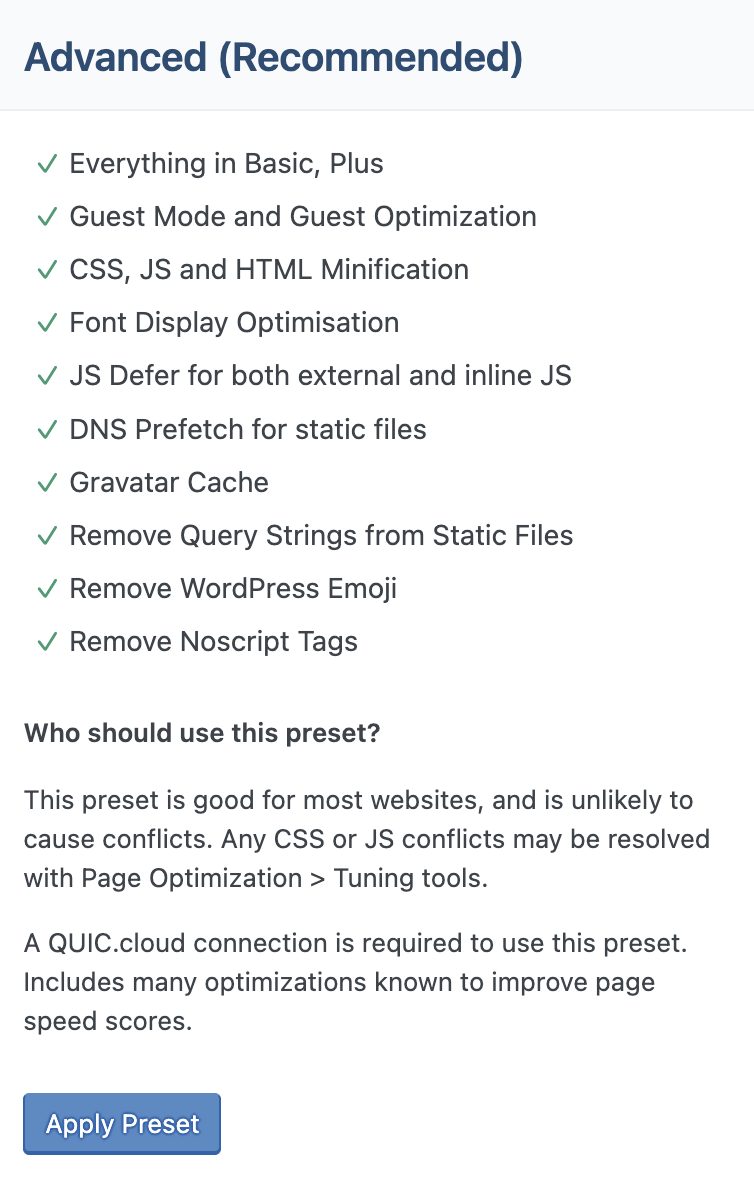
Page Optimisation
The settings here are critical to the proper function of the cache.
CSS Settings
- Ensure "CSS Combine" is turned off, this is known to cause issues with both Divi and Elementor.
JS Settings
- Ensure JS Combine is turned off.
- Ensure load JS deferred is set to Deferred.
JS Combine will still be on for some users due to guest optimisation. This is fine.
HTML Settings
- Turn on "Load Google Fonts Asynchronously"
Media Settings
- We want to utilise lazy loading so start by switching on Lazy Load Images
- Now we need to add a placeholder, luckily an invisible asset it provided by litespeed:
data:image/gif;base64,R0lGODlhAQABAIAAAAAAAP///yH5BAEAAAAALAAAAAABAAEAAAIBRAA7- Next we want to ensure that "Lazy Load Iframes" is turned off, this is known to cause issues.
- "Add Missing Sizes" should be set to on.
- "Wordpress Image Quality Control" should be set to "62"
VPI
- We want to enable "Viewport Images" this will help stop items jumping around the page upon loading.
- Ensure "Viewport Images Cron" is also switched on.
Media Excludes
- Finally, we want to ensure our logo media URL is added to "Lazy Load Image Excludes" this will stop the logo from being replaced with a placeholder while the page is loading.
Database
The database features are helpful for stopping long term bloat from page edits, blog revisions, etc.
DB Optimisation Settings
- "Revisions Max Number" should be set to "20".
- "Revisions Max Age" should be set to "30".
Manage
- Press the "Clean All" button a couple of times to clear out database bloat.
How did we do?